Showing posts with label Security and Hacking. Show all posts

Thursday, April 11, 2019

So You Think You Won’t Ever Be Hacked?


We all know that there are hackers out there. We’ve heard the warnings, and we know that we need to do something to protect ourselves and our businesses against an attack. But knowing and doing something are often two different things.

While most of us understand that there is a threat coming from cybercriminals, it’s easy to get lax when it comes to security. The idea of a hack might seem very far off. Besides, why would a hacker bother with a small target like you?

That’s exactly the way the hackers want you to think. Modern day hackers are very different from how they are portrayed in movies.

You’d be surprised to know that 18 adults worldwide become victims of a cybercrime every second.

Cybercrimes are often performed by criminal syndicates, where hackers work in groups and have access to some sophisticated resources. Like any other business enterprise, these syndicates want to make sure that their staff is operating at peak efficiency, so they give them the best possible tools.

And like a lot of companies, they’ve moved over to automated hacking. Any half-way decent programmer can come up with a program that would help her to exploit vulnerabilities in a computer system.

She would build in a function that ensures the virus can replicate itself quickly and easily, and soon it would be spreading without any interference on the part of the criminal.

That said, it’s not true that you’re not an easy target. Your system might be breached any time and your information stolen.

Don’t rely on your anti-virus program to protect you completely. While most of these programs are good, they’re only a small part of the process when it comes to defending your system against attacks. They’re only effective against known threats, but they cannot stop you from clicking on suspicious links or downloading files infected with viruses.

Your best defense is to start taking online security a lot more seriously, even if it means bothering with extra work such as using and writing down different passwords for every site you use. It might be boring, but it will improve your online security.


Wednesday, July 12, 2017

Jayden K Smith: Why you should ignore this Facebook hacker hoax


Facebook users are being duped into circulating a hoax message warning them not to accept friend requests from an account called Jayden K Smith.

The message, being sent via Facebook Messenger, warns that the account is a hacker who "has the system connected to your Facebook account".

Well-meaning users are sharing the message widely, but as with most viral Facebook posts, the message is a hoax. There is no evidence of any account with the name Jayden K Smith going on sprees of adding users, and even if there were, they would not be able to hack into an account just by becoming a friend.
Mass friend requests to unknown users is also against Facebook's terms and conditions regarding spam, so any such account would probably be quickly dealt with.

This hasn't stopped the message gaining widespread traction online. It reads: "Please tell all the contacts in your Messenger list, not to accept Jayden K Smith friendship request. He is a hacker and has the system connected to your Facebook account. If one of your contacts accepts it, you will also be hacked, so make sure that all your friends know it. Thanks. Forwarded as received."

The message is a common hacker warning that often gets recycled online, with different variations of the name. Others include Anwar Jitou, Tanner Dwyer and Bobby Roberts. The message does contain many of the elements of a viral hoax: a sensational warning, the prospect of devastating consequences, and a prompt to share it widely.

The unfortunate accounts that happen to be called Jayden K Smith have now been given their 15 minutes of internet fame.
Scam messages easily take hold on facebook. Two common other versions warn that all your photos will be made public unless you share a message opting out of the feature and another saying that Facebook will start charging for the service unless you confirm you want it for free.


How to Remove Googleleadservices.com Virus?

You got a mail similar to this? and clicked?

Googleleadservices.com is a malicious browser redirect virus which created to take effect on the target computer. This redirect virus is not the same as the legit search engine web like Google and Bing. It used to pretend as a useful and good search engine. When you are being redirected to this fake website, you may see that nothing looks differently from its fake screen. Everything seems to be good before you use it to search your favorites. Once this virus gets into your computer, it will immediately show its ability. Once infected, it will take the whole control of your online actions and then redirect you to Googleleadservices.com right away. Then it will change your default home page and search engine automatically without your approval. You don’t have any way to change these settings back unless you remove the virus from the compromised computer. Besides, if you do the research on the fake web, you may find that all the provided links are nothing related to your key words, but kinds of unknown things and malicious website links. In addition, lots of pop-ups and commercial ads will display on your web screen to stop you from doing anything normally. Thus, you should know that removing this fake website is the most urgent task as soon as you see it on your computer.
Googleleadservices.com Virus can get into your computer with the help of third party applications. That is why you know nothing about this virus until it is found. This infection used to infect your computer through downloading freeware, visiting suspicious websites or links, reading or responding spam emails as well as its attachments and installing unsafe programs on your computer. Once infected, you will get kinds of fake alerts telling you about the threat on the compromised computer. But when you do a full scan on the computer, nothing malicious is founded except kinds of caches and unless files. Furthermore, this malicious virus can bring into other computer threats like Trojan horse, Adware and malware, spyware as well as other infections into your system. As a result, your computer will work more and more slowly comparing to before it was not infected. If you want to get your computer back to normal again, you’d better remove Googleleadservices.com virus from your infected computer as early as you can.

Basic Symptoms and Potential Risks of Googleleadservices.com Infection

1. It can be added to Internet Explorer, Mozilla Firefox or Google Chrome browsers without your notification.
2. You are rerouted to some unknown sponsored websites that you have never seen before when you surfing online.
3. You can get a bunch of popup ads show on the webpage which you are browsing.
4. It can be installed on your computer slightly.
5. This browser hijacker can introduce various infections and unwanted programs onto your system,
6. It can investigate your browsing behavior and gather your input information online.
7. It is also responsible for collecting computer user’s private information like IP address and online traces for unethical using of online marketing.

Note: If one of symptoms mentioned above is found in your computer, then you must know that your computer is being attacked by the browser hijacker. Since the browser hijacker is so dangerous, once your computer is infected, you should take actions to delete the hijacker. If you are not a computer expert, in case you lose your important data or damage your system, please welcome to contact Yoocare/Yoosecurity Online Expert for help now!

Manual Removal Guide:

Googleleadservices.com Hijacker hijacks your default browser to redirect your web search results and modifies your default homepage and browser settings. Manual removal is the most effective way to completely uninstall it from an infected computer’s operating system, for the season that this hijacker is so cunning and dangerous, antivirus programs cannot get rid of it permanently. Here are the manual guides for users to remove the annoying hijacker.
1. Clean Add-ons and Extensions
* Internet Explorer:
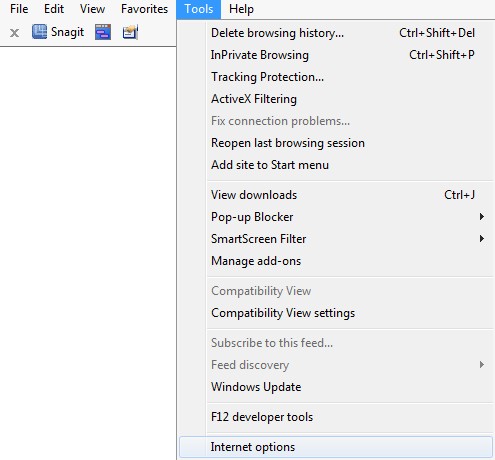
(1). Click Tools in the Menu bar and then click Internet Options
Tools in IE
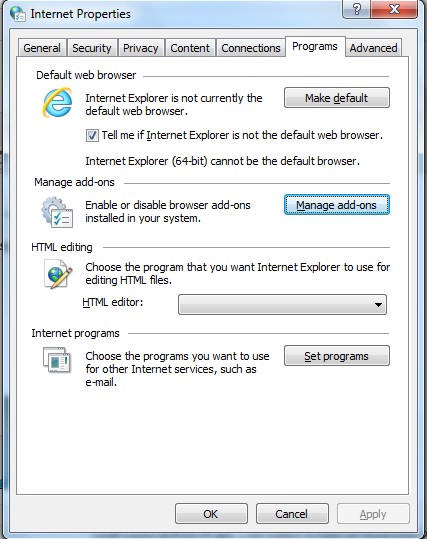
(2). Click Programs tab, click Manage add-ons and disable the dubious add-ons
* Firefox:
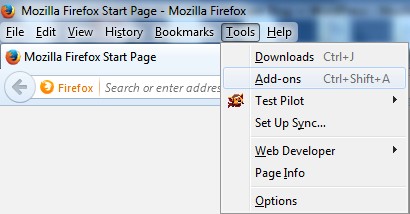
(1). Click Tools in the Menu bar and then click Add-ons
Tools in Firefox
(2). Click Extensions, select the related browser add-ons and click Disable
* Google Chrome:
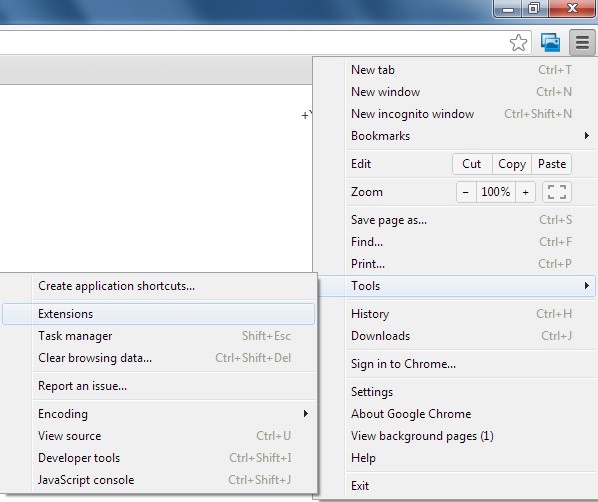
(1). Click Customize and control Google Chrome button → Tools → Extensions
Customize and control Google Chrome button
(2). Disable the extensions of this virus
2. End Relevant Processes
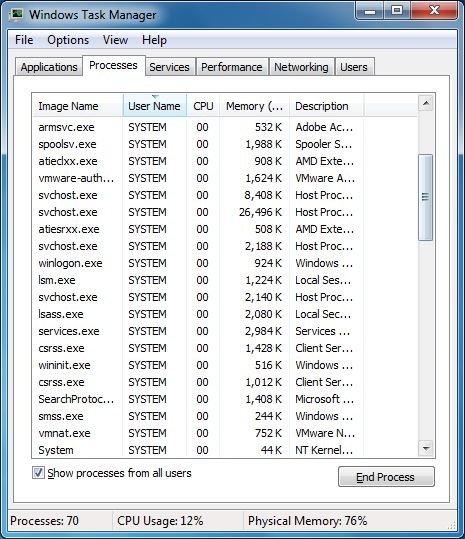
(1). Press Ctrl+Shift+Esc together to pop up Windows Task Manager, click Processes tab
Windows Task Manager
*For Win 8 Users:
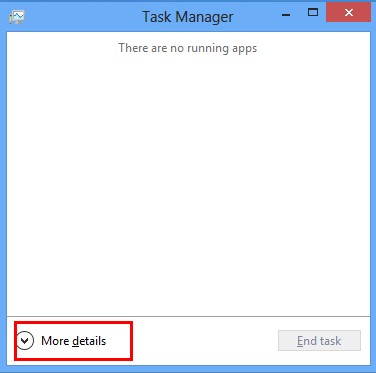
Click More details when you see the Task Manager box
Win 8 Task Manager
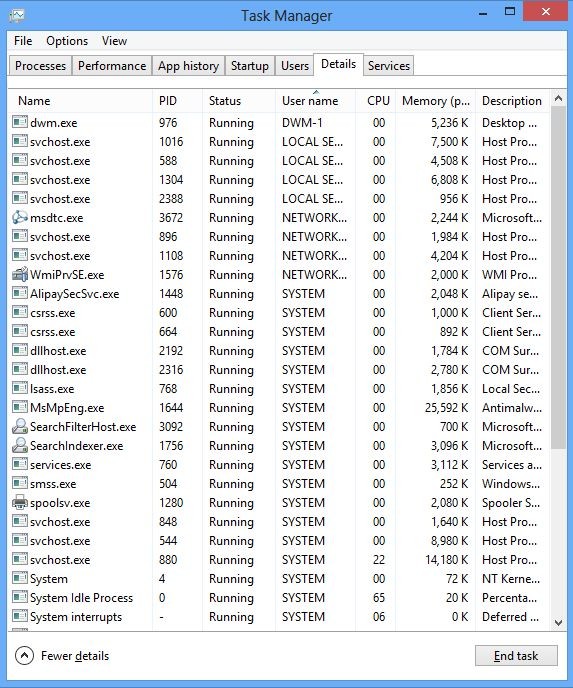
And then click Details tab
Details Tab in Win 8 Task Manager
(2). Find out and end this hijacker’s processes
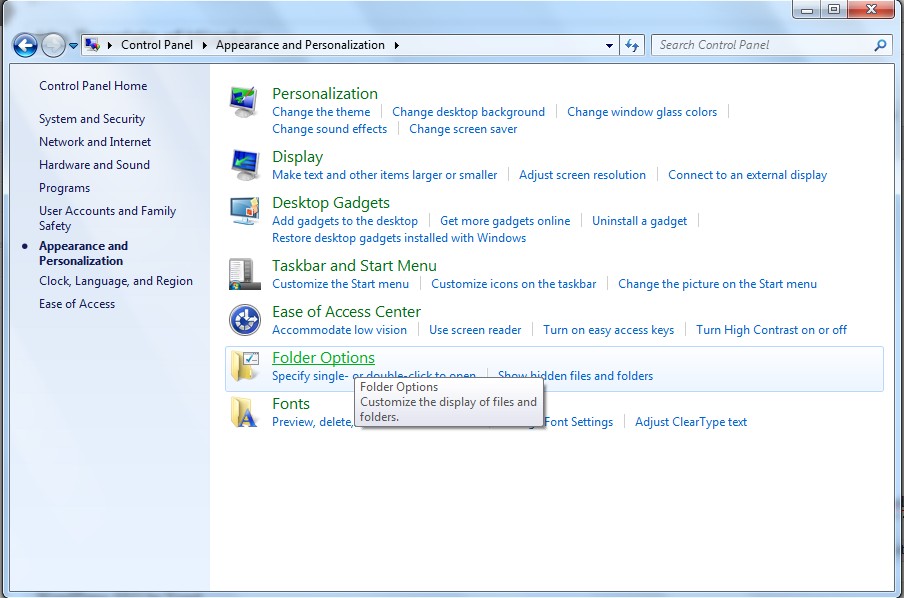
3. Show Hidden Files
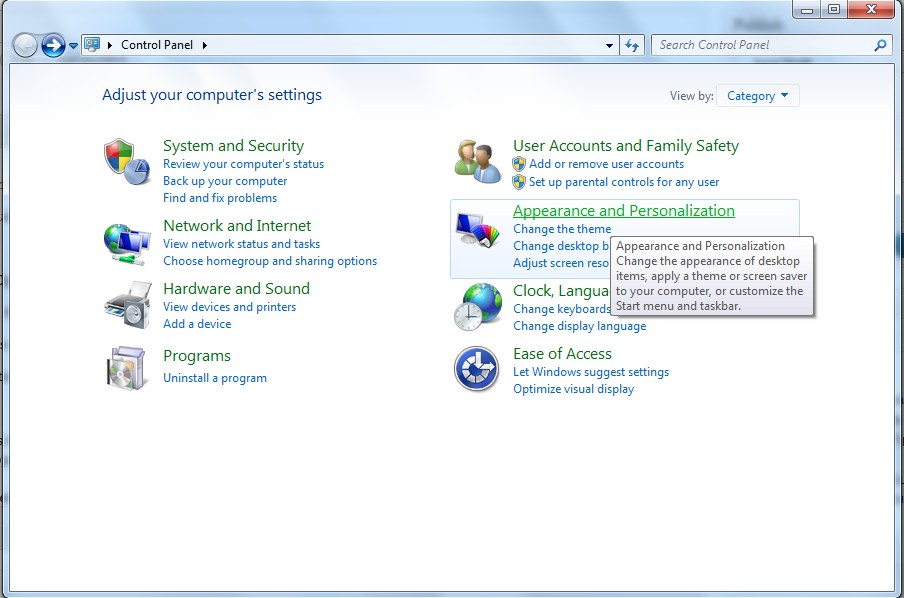
(1). Click on Start button and then on Control Panel
(2). Click on Appearance and Personalization
(3). Click on Folder Options
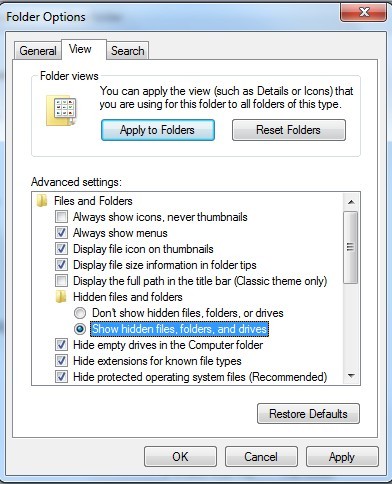
(4). Click on the View tab in the Folder Options window
(5). Choose Show hidden files, folders, and drives under the Hidden files and folders category
(6). Click OK at the bottom of the Folder Options window
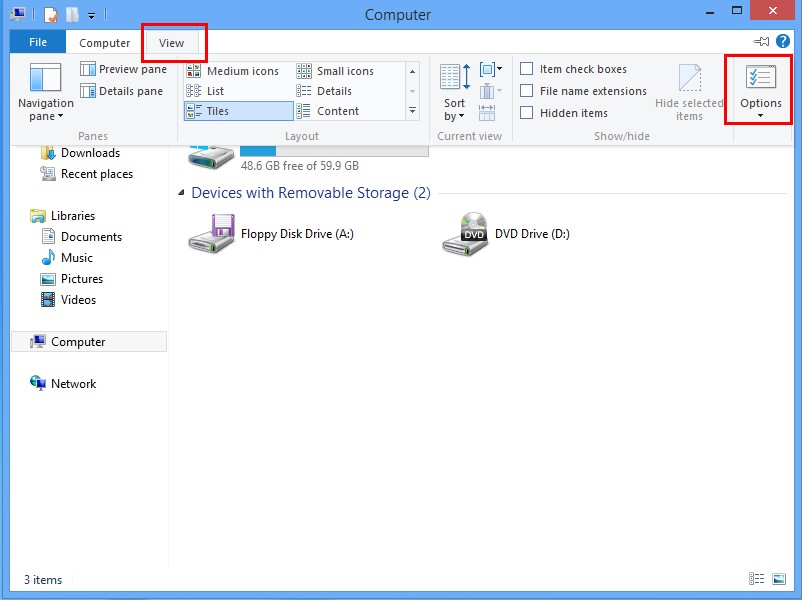
*For Win 8 Users:
Press Win+E together to open Computer window, click View and then click Options
View in Computer Window
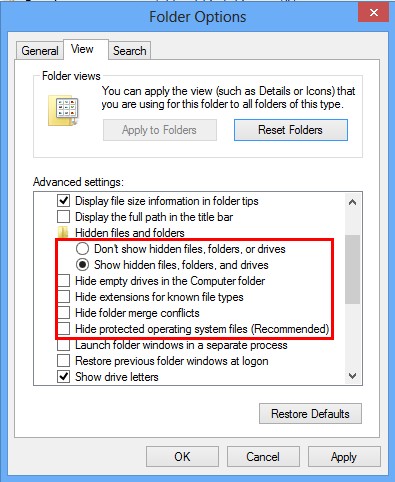
Click View tab in the Folder Options window, choose Show hidden files, folders, and drives under the Hidden files and folders category
View Tab in Folder Options Window
4. Delete Relevant Registry Entries and Files
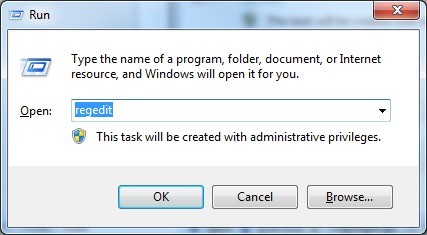
(1). Delete the registry entries related to this browser hijacker through Registry Editor Press Win+R to bring up the Run window, type “regedit” and click “OK”
While the Registry Editor is open, search and delete its registry entries
HKEY_CURRENT_USER\Software\Microsoft\Windows\CurrentVersion\Run\[RANDOM CHARACTERS].exe HKEY_CURRENT_USER\Software\Microsoft\Windows\CurrentVersion\Run ‘Random’ HKEY_LOCAL_MACHINE\Software\Microsoft\Windows NT\CurrentVersion\Random HKEY_CURRENT_USER\Software\Microsoft\Windows\CurrentVersion\Internet Settings “CertificateRevocation” =Random
(2). Find out and remove the associated files
%AllUsersProfile%\random.exe %AppData%\Roaming\Microsoft\Windows\Templates\random.exe %AllUsersProfile%\Application Data\~random %AllUsersProfile%\Application Data\.dll HKEY_CURRENT_USER\Software\Microsoft\Windows\CurrentVersion\Random “.exe”
Conclusion
Googleleadservices.com virus is a malicious and pesky browser hijacker virus which can penetrate into your computer secretly without your attention. Commonly, this virus can be bundled with the “free” software downloads, unsafe websites, spam emails and junk email attachments as well as suspicious pop-ups, ads, links. Hence, you should be very careful when browse online. Once infected, this virus has the ability to spy your browsing habits and history and then collect your sensitive information such user names, IP address, financial details. In short, Googleleadservices.com virus is a completely unwanted and bad application which should be removed without any hesitation as soon as it is detected. So far, only manual removal can help you remove this virus completely and permanently. If you don’t how to do, please contact YooCare Online Expert for further assistance right now!
Suggestion: The above manual removal is quite dangerous and complicated, which needs sufficient professional skills. Therefore, only computer users with rich computer knowledge are recommended to implement the process because any errors including deleting important system files and registry entries will crash your computer system. 

Tuesday, May 16, 2017

WannaCry ransomware cyber-attacks slow but fears remain


A computer malware that has spread across 150 countries appears to be slowing down, with few reports of fresh attacks in Asia and Europe on Monday.

However staff beginning the working week have been told to be careful.

The WannaCry ransomware started taking over users' files on Friday, demanding $300 (£230) to restore access.

Hundreds of thousands of computers have been affected so far. Computer giant Microsoft said the attack should serve as a wake-up call.

BBC analysis of three accounts linked to the ransom demands suggests only about $38,000 (£29,400) had been paid by Monday morning.

However, the ransomware warning said that the cost would double after three days, so the payments may increase.

It threatens to delete files within seven days if no payment is made.

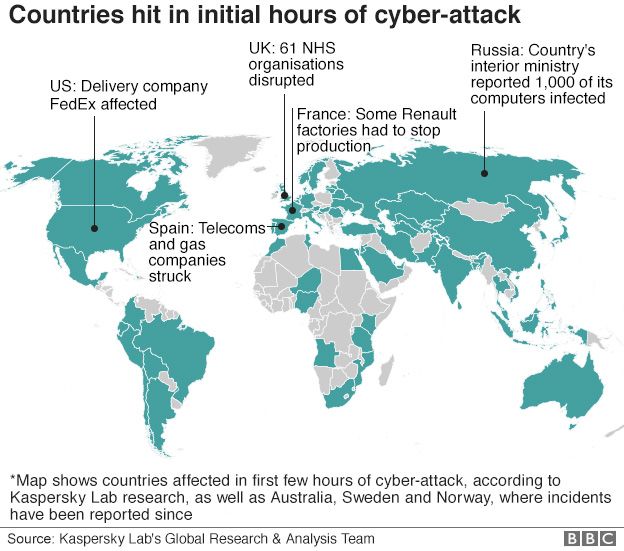
Among the organisations targeted worldwide have been Germany's rail network Deutsche Bahn, Spanish telecommunications operator Telefonica, US logistics giant FedEx and Russia's interior ministry.

Demo how the infection would be like?

How has Monday been so far?

Many firms employed experts over the weekend to try to prevent new infections.
The picture now appears better in Europe.
Senior spokesman for Europol, Jan Op Gen Oorth, told the AFP news agency: "The number of victims appears not to have gone up and so far the situation seems stable in Europe, which is a success.
 

"It seems that a lot of internet security guys over the weekend did their homework and ran the security software updates."

UK Health Minister Jeremy Hunt confirmed to the BBC that UK intelligence services had found no evidence of a second wave of attacks on Monday.

The UK's National Crime Agency earlier tweeted: "We haven't seen a second spike in WannaCry ransomware attacks, but that doesn't mean there won't be one."

The badly affected National Health Service said seven out of 47 trusts that were hit were still facing serious issues.

French carmaker Renault said its plant in the northern town of Douai would not reopen on Monday as it dealt with the cyber-attack. 

In Asia, where offices closed before the ransomware struck on Friday, the spread was reportedly slowing:
  • Australia: At least eight businesses reported being locked out of their systems
  • South Korea: Four companies reported problems over the weekend. One cinema chain was unable to display trailers
  • Indonesia: Records at two hospitals were blocked
  • Japan: Both Nissan and Hitachi reported some units had been affected, but not seriously
  • China: Hundreds of thousands of computers suffered initially, China's Qihoo tech firm said. Universities, with older systems, were particularly badly hit. Some payment systems and government services affected, but less than feared
Banking systems across the region were largely unaffected.

Who is behind the attack?

This won't take long. Nobody knows. Europol's Jan Op Gen Oorth said: "A bit early to say... but we are working on a decrypting tool".

Associated Press quoted Tim Wellsmore, of US security firm FireEye, as saying: "We expect this is a small operation... They just happened to hit the mother lode."

Russian President Vladimir Putin said: "Russia has absolutely nothing to do with it."

Should people pay?

Companies in Asia and Europe have been warning employees to be careful when clicking on attachments and links in their emails.

The message from the UK's National Crime Agency was "do not pay!" - there is no guarantee that systems will be restored.

Michael Gazeley, of Network Box, a Hong Kong-based cyber-security firm, told Reuters there were still "many 'landmines' waiting in people's inboxes", adding that his firm had detected a new version that infected users directly via a malicious link on hacked websites.

Becky Pinkard, from Digital Shadows, a UK-based cyber-security firm, also said it would be easy for the initial attackers or "copy-cat authors" to change the virus code so it is difficult to guard against.
A UK security researcher known as "MalwareTech", who helped to limit the ransomware attack, predicted "another one coming... quite likely on Monday".

MalwareTech, whose name was revealed in UK media to be 22-year-old Marcus Hutchins, was hailed as an "accidental hero" after registering a domain name to track the spread of the virus, which actually ended up halting it.

What's behind Microsoft's 'wake-up call' warning?

The computing giant says the tool used in this current attack had been developed by the US National Security Agency and was stolen by hackers.

It is highly critical of the way governments store data on software vulnerabilities.

 
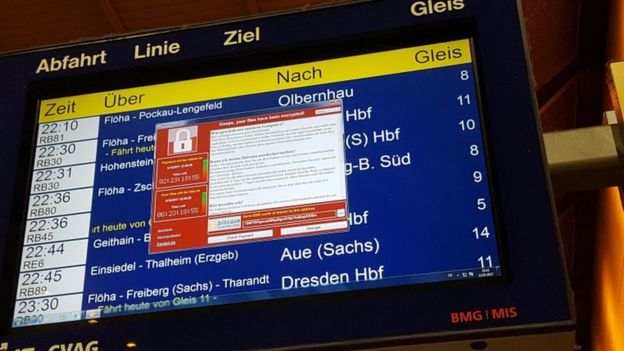
A railway station system in Chemnitz, eastern Germany, is infected

Microsoft president and chief legal officer Brad Smith said on Sunday: "We have seen vulnerabilities stored by the CIA show up on Wikileaks, and now this vulnerability stolen from the NSA has affected customers around the world.

"An equivalent scenario with conventional weapons would be the US military having some of its Tomahawk missiles stolen."

The organisation also said that many organisations had failed to keep their systems up to date, allowing the virus to spread.

Microsoft said it had released a Windows security update in March to tackle the problem involved in the latest attack, but many users were yet to run it.

Analysis: Dave Lee, BBC North America technology reporter

There are going to be some tough questions on Monday for those institutions which didn't do enough to keep their networks secure, as well as the organisations that were best placed to stop it happening in the first place - the NSA and Microsoft.

The NSA keeps a chest of cyber-weapons to itself so it can hit targets, but Microsoft has long argued that this is dangerous. If there is a flaw in Windows, the company said, surely the safest thing to do is to let its team know straight away so it can be fixed.

But then Microsoft also needs to consider what obligation it has to update all users - not just the ones who pay extra for security on older systems. 

Updating your computer if you're an individual is a piece of cake, but for a network the size of Britain's National Health Service? Tough - time-consuming, expensive and complex. 

For a company like Microsoft to say it won't keep those systems safe unless they shell out more money, then that in itself, I think, is something of a ransom.


Monday's Ransomware Attack Fails to Dent India, Says Minister: 10 Facts

Monday's Ransomware Attack Fails to Dent India, Says Minister: 10 Facts
Two districts in Kerala, one in Bengal affected by Ramsomware WannaCry.
The Ransomware WannaCry virus has wormed its way into India, with fresh incidents reported from Kerala and Bengal. In Kerala, one of the most digitized states of India, half-a-dozen computers across two districts -- Waynand and Patanamthitta -- were affected. In Bengal, some computers of the state electricity discom were hit. Admitting some "isolated incidents" were reported, Union IT minister Ravi Shankar Prasad said the government is keeping watch on the situation. Precautions have been taken on a war footing in telecom, power and aviation sectors to stop the virus that locks data and demands 300 Bitcoins to unlock it. 
 
Here are the 10 latest developments in this story:
  1. "The computers (at the panchayat in Kerala's Waynand) were using pirated version of Microsoft. They have been isolated and shut down. No sensitive information lost," said Manoj Abraham, a senior police officer in charge of Kerala's cyber security. "We have a specific Ransomeware school in cyberdome, which has been dealing specifically with such threats," he added.
  2. Power officials from Bengal said computers in four blocks of West Midnapore - Belda, Datan, Narayangarh and Keshiyari -- have been affected. "Some of the systems of our Computer Car Centres were initially attacked, which had no impact on our overall business operations," read a statement by the West Bengal State Electricity Distribution Company Limited.
  3. While the computers have been shut down and isolated, the power utility runs the risk of having more of its computers affected. Reports say computers in the power utility at Balurghat in Bengal's South Dinajpur have also been affected.
  4. Union minister Ravi Shankar Prasad said the government has been updating its security system since March. "We are installing patch system to stonewall any cyber attack. We are also going to set up cyber coordination centre by June," he added.
  5. Over the weekend, more than 100 systems of the Andhra Pradesh police department were affected by the WannaCry virus.
  6. India's cyber security unit CERT-In said it has not received any formal report of cyber-attack today on India's vital networks.
  7. The Reserve Bank of India has asked banks to follow the instructions of government organisation CERT-In to prevent 'WannaCry' attacks. Automated Teller Machines or ATMs are highly vulnerable to malware attacks. Most of the 2.2 lakh ATMS in India run on the old version of Microsoft's Windows operating system.
  8. Central transmission utility Power Grid today said it has put sufficient firewalls to deal with the global cyber-attack.
  9. Ransomware is a malicious software that locks a connected device, such as a computer, tablet or smartphone and then demands a ransom to unlock it. Over the last week, it has hit various IT networks in over 150 nations - the worst hit being UK, where computers of the National Healthcare System were compromised.
  10. WannaCry can infect all computers in a network and systems running on Microsoft XP are particularly vulnerable since the company has not issued updates for some time. After the cyber attack, Microsoft has issued a patch for Windows XP that needs to installed for protection from WannaCry.

Monday, April 17, 2017

Problems with home security & technology

Problems with Home Technology & Security

Go into any home in today's world, and you'll likely find some form of technology. Whether it's a smartphone, a baby monitor, surround sound speakers, or a security system, we now rely heavily on technology to help us complete tasks, to entertain us, to keep us safe, and so on.

With the increased intelligence of technology, we're able to do things that were never thought imaginable. While this has taken us to new heights in the world of discovery, the growing intelligence of technology has also become increasingly involved in our personal lives. Not only do we use technology to call friends, plan meetings, and send files, but we also use our phones, laptops, and iPads to hold documents, store passwords, and track our locations. 
Problems with Home Technology & Security
In the grand scheme of things, it seems that the convenience of technology is too good to give up for a little added safety. However, the more we rely on technology, the more our protection is weakened. If you're curious about how home technology is having an effect on our level of protection, the following are some of the problems that arise with home technology and security. 


Hackers

One of the biggest issues with home technology and security is that it has the potential to be broken into by online hackers. Regardless of how large or small a system is, hackers have the ability to breach even the most complicated systems where they can steal information, take money, and create irreversible damage for lots of people.

In 2016, there were over 2 billion records stolen by hackers before the year was even over. Some of the biggest companies in the world had to deal with compromised accounts, including LinkedIn and MySpace, where confidential passwords were sold and over 117 million accounts were hacked. So, what does any of this mean for home technology and home security? Essentially, if billion-dollar companies can get hacked into, chances are your phone or tablet is going to be a cinch to break into.
Heading
For all of the people who rely on their home technology to get them through the day, it's likely that sensitive information is being saved on these tech toys, putting lots of people at risk. Information such as their home location, garage code, and even security system passwords are often saved within home technology, which can often be breached and shared publicly. Burglars who need only a few pieces of information to grant themselves access into your home will have no trouble if you're not smart about your technology and personal information. 

Heading

Public Access

For those people who are not technological hackers but who are experienced with break-ins, a lot of the personal information mentioned is just as accessible to them via public access. Whether it's a social media platform like Facebook or a location tool like Google Maps, any account that is set to Public is exposed to prying eyes.

This is why it is so important for home technology to be used intelligently, which will require users to install privacy settings and to only allow certain users to view their information. Anyone with a public profile can easily share information about their whereabouts, home location, etc. with viewers who have other intentions for the information.

The following are some of the accessible pieces of information that should be blocked or kept to a minimum to ensure the safety of your household members and everything within the home.

Heading

Location Finder

Many of our iPads and smartphones are equipped with a feature known as "Location Services," and, if you're not familiar with the feature, there's a good chance you're sharing your location without even knowing it.

Essentially, your phones and tablets get your permission to allow apps and websites to gather information from your Wi-Fi, GPS networks, and Bluetooth to determine your approximate location at any given time. For many people, this is a fun feature that displays where they are when they send tweets, take photos, perform live streams, etc.

While a location finder is most helpful when you're using a GPS tracker to get directions, having a location finder on at any other time can be very harmful to your security. For example, a family who posts about their week-long trip location is handing out valuable information about their empty house and for how long it will be empty. Similarly, anyone who does live streams might be sharing enticing information for thieves about what they have in their household or that the house is currently empty.
All of the things we share online in a public forum are accessible to people both near and far. Surprisingly, it is more common for a burglar to be someone who lives in your area than to live farther away. You may consider this person a friend or neighbor; however, if they can see where you are and know where you live, your home is exposed to potential theft or damage.
It's best to go into your settings on all of your home technology and ensure that location services are turned off. You can turn these services back on when you're comfortable or leave them off at all times to ensure your phone isn’t being tracked. 

Heading

Live Streaming

Live streaming is one of the newest features in our home technology that can be used on laptops, phones, and iPads. The idea is for users to upload video footage of their current whereabouts, and it has become very popular for users of all ages.

The trouble with live streaming is that it serves to inform watchers where the user is and, often, shares information about what they're doing, whether they're at home, and what kinds of valuables can be seen in the area. This kind of feature is very limited when it comes to security precautions, and many people are not careful enough when it comes to sharing live information.

Heading
For hackers, burglars, and unwanted viewers, live streaming can be a technological tool to get them up-to-the-minute information about a home and whether the owners are present or not. While many adults have the proper decision-making skills to keep their exact location a secret, children often struggle with the parameters of live streaming and can give away personal information about their whereabouts, home locations, routes to school, etc.

This kind of home technology is most certainly a factor when it comes to security. For those families with children, it's even more important to have family discussions about safe technology practices and why it's important for kids to maintain the privacy settings their parents set for them. 

Heading

Social Media Updates and Statuses

Social media use has the power to connect us with friends and family all over the world, and, for the most part, it's one of the greatest solutions to long-distance communication. While there are many great things about social media, this home technology can also be a culprit of home security problems.
Social media types come in a variety of forms, including Instagram, Facebook, Twitter, and more. Many of these platforms require users to upload locations, photography, audio, video, and messages to let others know about their personal life.

Sharing this personal information between small groups of friends can be fun; however, giving access to those who may be looking for an easy home target can end in disaster for homeowners. Updates are usually to-the-minute, and profiles that are public can often give information about the homeowner's whereabouts in a status, photo, or video. It is crucial that social media users are always updating their passwords and making them unique, as well as going through their settings to ensure their information is private.
It's also a good idea for social media users to go through their current followers, to ensure that they know everyone or have a specific relationship with them that they can trust. While many people prefer to increase their followers by going public, this kind of security breach is not worth the attention.

Heading

Audio and Video Output

One of the other great ways for people to stay connected is by using audio and video outputs on their laptops and cell phones to communicate. Programs such as Skype are live-streaming video applications, which users can install to speak with friends, organize work meetings, or share visual information.

While Skype is a great program for communication, its security walls are not quite as impressive. For many users, daily hacks are a constant reminder that not even the hardest password or security question can keep spammers and hackers out of their account. Some Skype users who have been hacked have expressed how easy it is for spammers to guess their security questions, thereby gaining access to their e-mail and changing their passwords.

Once a spammer can get into your Skype account, they can then access all of your other contacts as well. It's a serious problem, but it's also not the only one. For hackers, laptops are incredibly helpful for
Heading
gaining knowledge about a home and what it contains. Once a hacker gets into a laptop, they can manipulate the camera settings and turn the lens on again, even when the user doesn't have it turned on.

With this kind of breach, a hacker or spammer can gain visuals of the home, including its layout and the valuables that it possesses. It's also possible for hackers to override the microphone and audio in a laptop, which means that any conversations can be heard even when the laptop is closed. Home security can be breached and break-ins are much easier if a burglar can get information about the home ahead of time. 

Heading

Solutions to the Problems with Home Technology & Security

It would be unrealistic to suggest that all homeowners set aside their technology and start sending snail mail again. Technology has done many great things for this world, and it would be impossible to revert back to simpler times.

Unfortunately, with this great power comes a lot of responsibility. Companies who are coming out with these new features, apps, and programs need to seriously consider the security problems that could arise, and they need to make them known to potential users ahead of time.

Heading
If you're trying to find solutions to problems with your home technology, the first thing you'll want to do is re-set your passwords, making each one unique and strong. It is also very important to try to refrain from saving these passwords on your phone and, instead, have them written down on a piece of paper and store that paper somewhere in the home where you won't forget.

If the program you're using has security questions, you'll want to be as creative with these as possible, as well. Make sure that the information you're using is not accessible anywhere else on your social media platforms, such as maiden names, dog's names, or previous schools.

Even if you do have a security breach with your home technology, the next step in protecting your home is investing in a home security system. A quality system will be your best defense against burglars, and modern systems will be able to notify the correct authorities at the first sign of theft, damage, or potential break-ins. Systems like these can also notify authorities about potential fires, hot spots, and smoke, so the added benefits of investing in this type of system are worth the investment to protect loved ones and possessions. 

Heading

Conclusion

If you're looking for ways to improve the security of your home, take some time to go through all of your devices and apply the information provided, such as turning off location services and keeping your profiles private. Everyone in your home should be educated about the possibilities of security breaches through technology and informed about the ways that they can avoid these kinds of problems.

Source

About Dilips Techno Blog

A Daily Blog for Latest Reviews on Technology | Gadgets | Mobile | Laptop | Software and Hardware Reviews | Social Media | Games | Hacking and security | Tips and Tricks | Many more....


Dilips Techno Blog

Dilips Techno Blog
Logo